


The most advanced marine HVAC on the water — DC air conditioning, rebuilt from the battery up.
Variable-speed hardware, a connected app, always-on telemetry and AI diagnostics — engineered together, from the battery up.
DC air conditioning, re-engineered from the battery up
Not a marinized household unit — a true DC machine designed around how boats actually make and store power. One platform, every house-bank voltage.

The industry-first mobile app for marine climate systems
Not a remote control — the first fully native app in marine climate, and the platform every future SeaAir device connects to. Free on iOS and Android.


Multi-device control
Every SeaAir machine on board, controlled from a single phone — switch between systems with a tap.
Energy insight
Amp-hours left and runtime remaining, right on the home card. Tap it and the app shows what a couple of degrees buys you — how long each set point lasts, and whether it gets you to morning.
Power budgets
No dead-battery anxiety: set a hard limit on total consumption and the system shuts off when it's reached — on batteries, generator or limited shore power.
Power modes
Decide how much power the machine uses as it runs — Auto, or pin it to Overnight, Daytime or Boost.
Firmware updates
Update over the air to get new features — automatically while the machine sits in standby, if you like.
Admin & pairing PINs
Lock device settings and pairing behind PINs to prevent accidental misuse.
AI system health checks
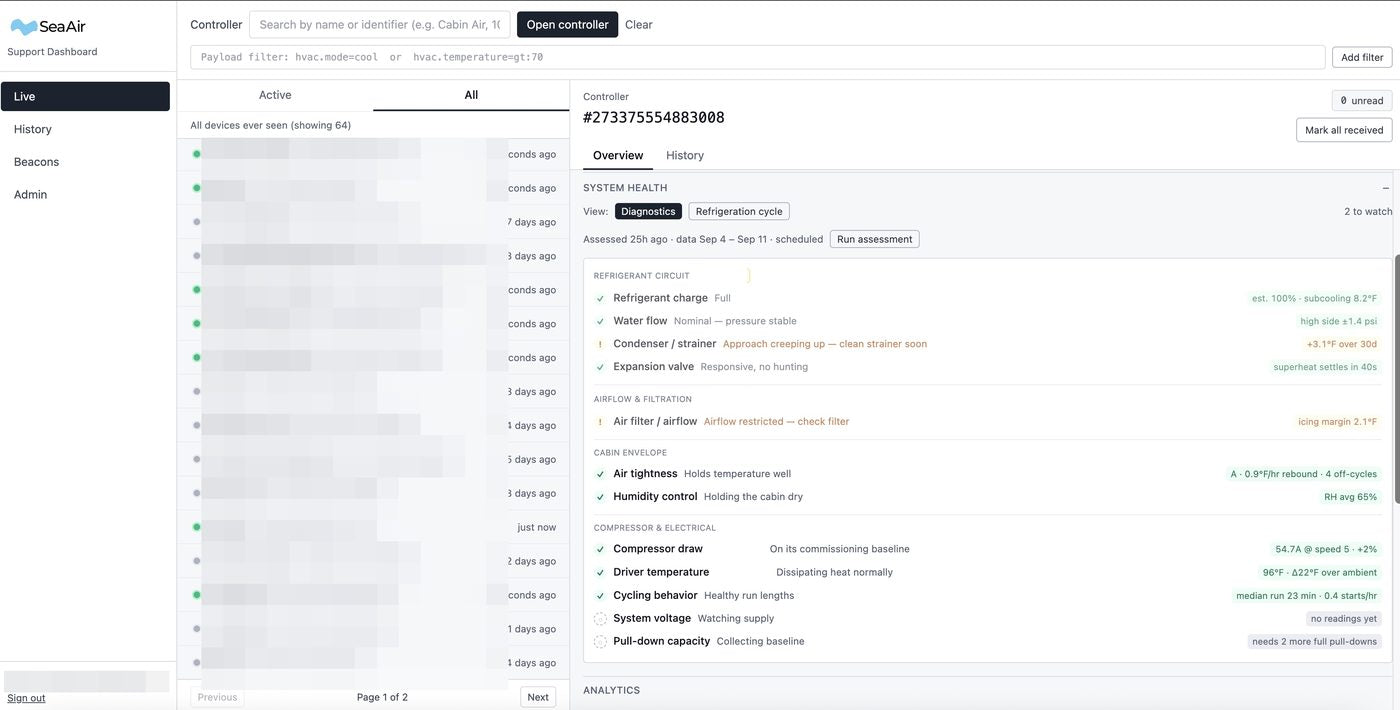
Reviews your machine's data daily and grades air tightness, humidity control, cycling behavior and supply voltage — plain-language verdicts, each with the fix.
Installation diagnostics
Advises on installation issues the data reveals — water flow, heat-exchange efficiency, dirty filters and more.
Performance graphs
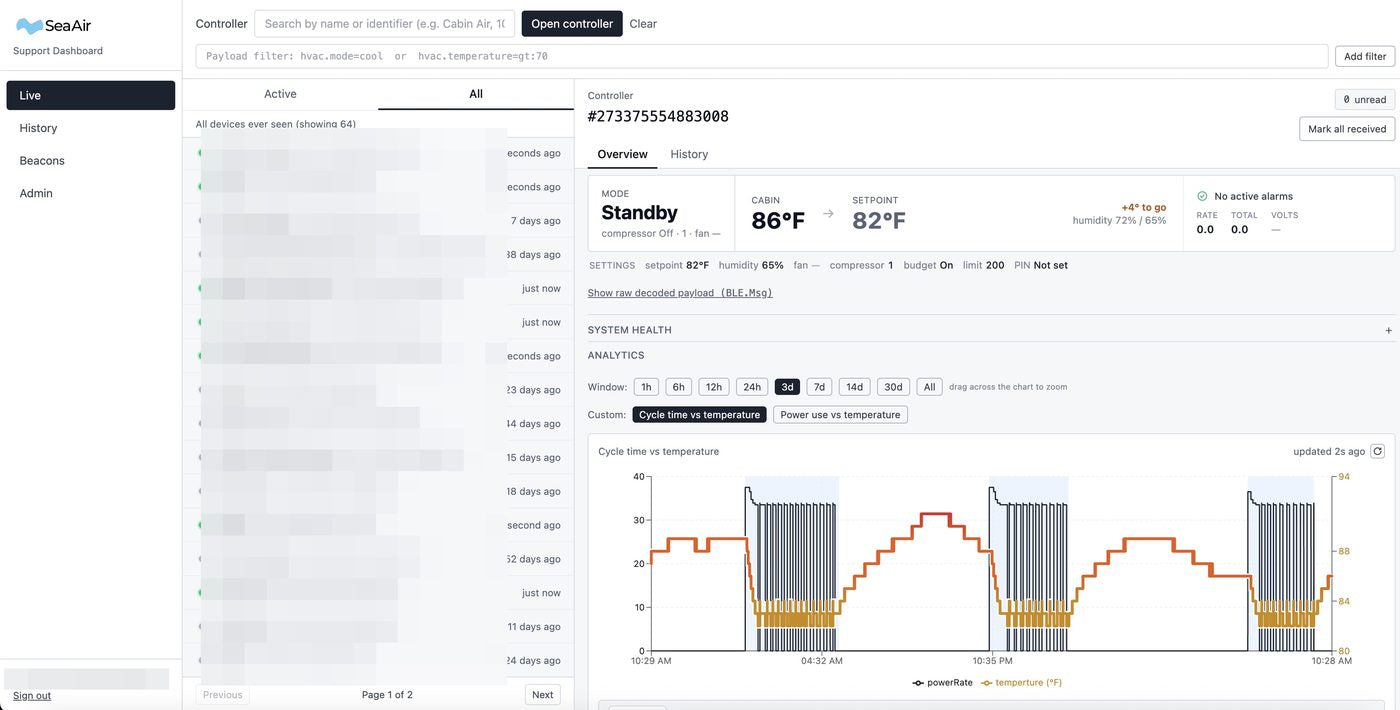
Power draw and temperature charted together — drag a finger across the chart to replay any moment of any run.

We can see what your machine sees
With your permission, your system shares telemetry over WiFi with our support team. When you call, we're not asking you to read blinking lights — we're already looking at the data.

Help is one tap away, right where you control the machine
Open the Support tab and press the help beacon. SeaAir sees your machine as if we were aboard — no fault codes to read out, no photos of blinking lights.
- We see what you see. Live readings, the history leading up to the problem, every alarm, and the real sensor values behind them: pressures, temperatures, voltage.
- Our diagnostics go to work. SeaAir's automated review reads your data for the patterns behind common faults and tells you how to fix the ones you can fix yourself.
- A SeaAir technician picks it up. An alert on our support dashboard puts your boat at the top of the list, and a person contacts you by phone, text or email.
A first in the industry, unique to SeaAir. We built it because we care about the people who run our machines. If your machine is off WiFi, your phone relays its data to SeaAir for 30 minutes after you press.
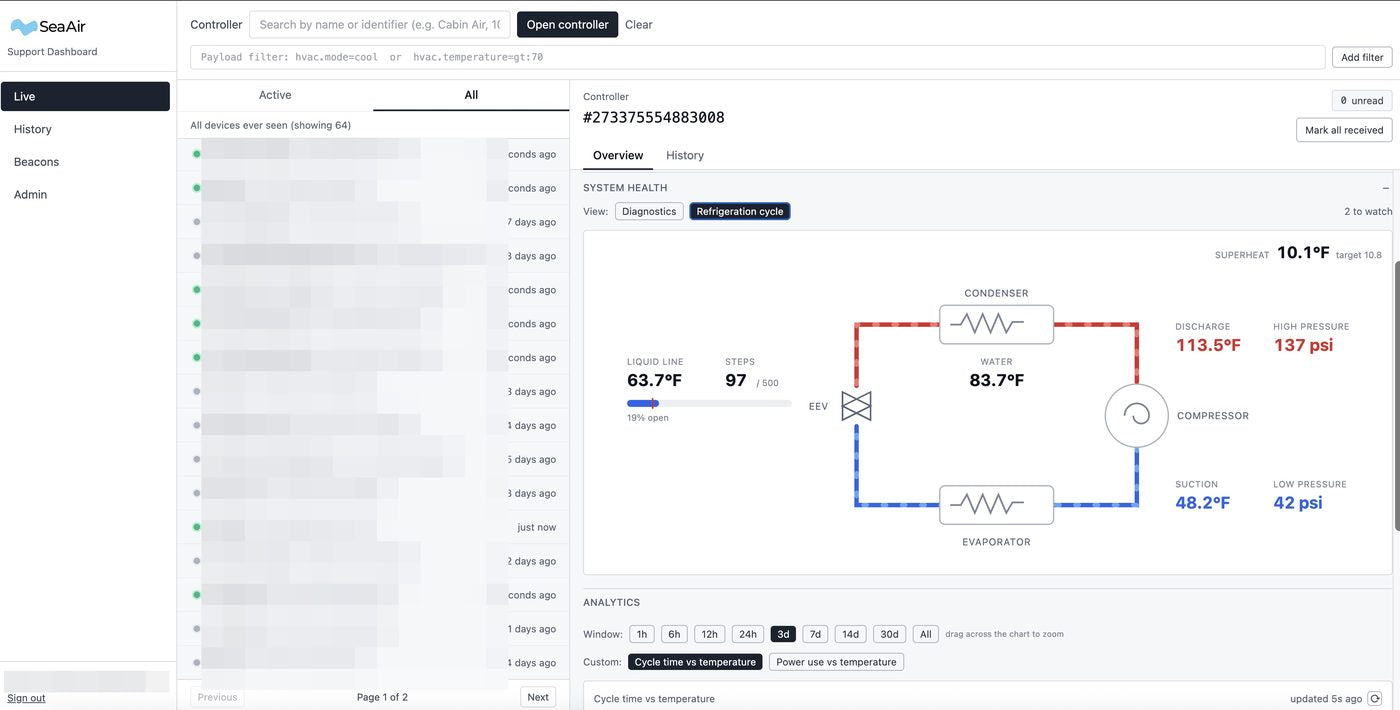
This is the actual SeaAir support dashboard — your machine's real data, live in front of our team. Temperatures, pressures, cycling, health checks, even the refrigeration circuit. World-class support with real information, not guesses.
On WiFi: streaming around the clock
Telemetry is always on. Over the boat's WiFi the machine streams continuously to our support dashboard, so our techs can diagnose remotely — often before you noticed anything was off.
No WiFi? Your phone carries it
The machine keeps logging and running diagnostics on its own. Even on Bluetooth only, tap the help beacon and your phone bridges the machine's live data to our support dashboard — your system appears online to our techs while we help you, no boat WiFi required.
Your data, working for you
The machine never stops: it stores its history, runs diagnostics to catch problems early, and shares the results with you through analytics and push notices. Telemetry exists to support you — it's shared with our team, not sold.
A technician in a box
Every day, your system runs AI diagnostics over a rolling week of its own telemetry and grades itself — then tells you what it found in plain language, with a status you can read at a glance. No fault codes, no guesswork.

Every finding comes with the fix
Tap any health check or alarm and the app explains the likely cause and how to fix it — from a blocked condensate drain to a probe placed too close to the supply air, down to the exact voltage thresholds that tripped an alarm.
Gen 3 goes deeper
Gen 3 machines add refrigerant-circuit sensors, unlocking checks on water flow, condenser condition, refrigerant charge and airflow — the diagnostics a tech would need gauges for. Rolling out with Gen 3
Nobody else shows you this.
Marine climate systems have always been black boxes. Yours charts itself — every run, every amp, every degree — and lets you replay any moment.
Power vs. temperature, together
See exactly what a degree of cooling costs in amps — with the chart tinted by mode so cooling, heating and dehumidify runs read at a glance.
Scrub through time
Drag a finger across the chart and read the full state at that moment: cabin vs. setpoint, humidity, compressor and fan speed, amps, total Ah, budget used, volts, alarms.
Amp-hours per day
Daily energy bars with run hours under each — plan your battery bank around real numbers from your actual boat, not brochure estimates.
Honest numbers
Energy is counted only from verified telemetry — a machine that goes offline never accrues phantom amp-hours. Data you can trust enough to size a bank with.
Comfort this smart doesn't need a generator.
See the complete system — everything included, ready to install.
